
MikroTik Network Specialists in Midrand
Motsebone Technologies provides professional MikroTik installation, configuration, troubleshooting and network support in Midrand, Gauteng.
Whether you need a new MikroTik router configured, an existing RouterOS network optimized, a secure business firewall implemented, fibre failover configured or a difficult networking problem diagnosed, our technical team can assist.
We work with businesses, offices, retail environments, warehouses, residential properties and organisations requiring reliable and professionally configured networks.
Our MikroTik services include:
- MikroTik router installation
- MikroTik configuration
- RouterOS configuration
- MikroTik firewall configuration
- VLAN configuration
- VPN configuration
- Multi-WAN and failover
- Fibre and LTE/5G failover
- Network troubleshooting
- Routing configuration
- DHCP and DNS configuration
- Network security
- Bandwidth management
- MikroTik network upgrades
- Existing MikroTik configuration reviews
- Ongoing MikroTik technical support
Need help with a MikroTik network? Contact Motsebone Technologies on 067 375 7803 or 011 568 6380.
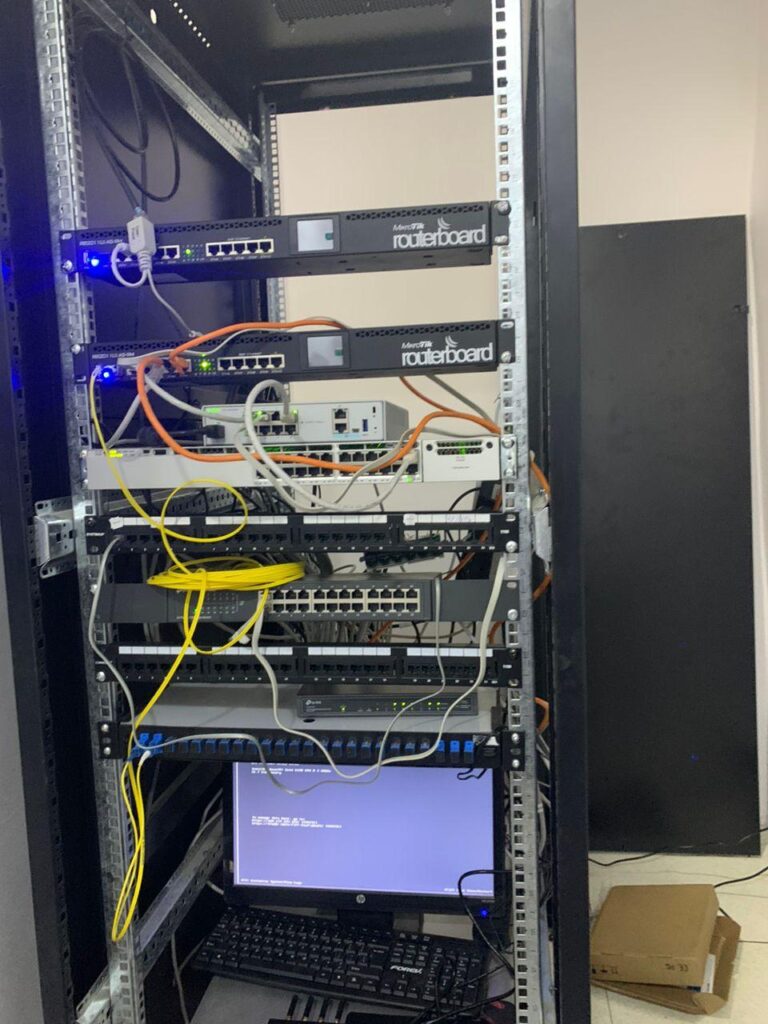
Professional MikroTik Installation in Midrand
A MikroTik router can provide significantly more control over a business network than a basic consumer router.
However, getting the most from MikroTik equipment requires proper configuration.
Motsebone Technologies can configure your MikroTik network according to your actual requirements, including:
- Internet/WAN configuration
- LAN configuration
- DHCP
- DNS
- NAT
- Firewall rules
- Routing
- VLANs
- VPN
- Port forwarding
- Failover
- Bandwidth management
- Remote administration
- Network monitoring
We can install and configure new MikroTik equipment or work with an existing MikroTik network.
MikroTik Router Configuration
MikroTik RouterOS provides extensive networking functionality, but incorrect configuration can result in connectivity problems, security weaknesses or unreliable performance.
Our MikroTik configuration services can include:
WAN Configuration
Configuration of your internet connection and WAN interfaces.
LAN Configuration
Private network addressing, DHCP and internal network services.
NAT Configuration
Network Address Translation for internet access and appropriate inbound services.
Firewall Configuration
Firewall rules designed around the actual requirements of your network.
DNS Configuration
Internal and external DNS configuration and troubleshooting.
DHCP Configuration
IP address allocation, reservations and network management.
Port Forwarding
Configuration of required services while minimizing unnecessary exposure.
MikroTik Firewall & Network Security
A MikroTik router should not simply be connected to the internet with its default configuration.
Motsebone can review and configure security controls including:
- Firewall rules
- Input filtering
- Forward filtering
- NAT
- Address lists
- Port restrictions
- Management access
- Remote administration
- VPN access
- Unnecessary service restrictions
- Network segmentation
We can also review an existing MikroTik configuration to identify potential security and configuration issues.
For businesses requiring more advanced security controls, MikroTik can also be deployed alongside dedicated security platforms such as Sophos.
MikroTik VLAN Configuration
VLANs allow businesses to logically separate different categories of network traffic.
For example:
VLAN 10 – Management VLAN 20 – Staff VLAN 30 – Guest WiFi VLAN 40 – CCTV VLAN 50 – VoIP VLAN 60 – IoT VLAN 70 – ServersThe exact VLAN design depends on your business and network architecture.
Proper VLAN configuration can help improve:
- Network organisation
- Security
- Traffic management
- Guest isolation
- CCTV separation
- VoIP performance
- IoT isolation
Motsebone can configure MikroTik VLANs and integrate them with compatible switches, access points and other network equipment.
MikroTik VPN Configuration
Businesses increasingly require secure connectivity between employees, offices and remote locations.
Motsebone can assist with MikroTik VPN configuration for appropriate use cases including:
- Remote access
- Site-to-site connectivity
- Branch offices
- Remote administration
- Secure network access
- Inter-office connectivity
The appropriate VPN technology depends on the RouterOS version, network architecture and security requirements.
MikroTik Fibre Failover
Internet downtime can interrupt business operations.
A MikroTik router can be configured to use multiple internet connections where supported.
For example:
Primary Fibre
↓
MikroTik Router
↓
Secondary LTE/5G/Fibre Connection
If the primary connection fails, the router can be configured to move traffic to the secondary connection.
Motsebone can assess your requirements and configure appropriate failover and routing policies.
MikroTik Multi-WAN & Load Balancing
Businesses with multiple internet connections may benefit from advanced routing configurations.
Potential applications include:
- Dual fibre
- Fibre + LTE
- Fibre + 5G
- Multiple ISPs
- Load distribution
- Connection failover
- Policy-based routing
The correct implementation depends on the internet services, router hardware and applications being used.
MikroTik Routing Services
MikroTik can be used for considerably more than basic internet sharing.
Motsebone can assist with appropriate routing requirements including:
- Static routes
- Policy routing
- Route prioritization
- Internet failover
- Multi-WAN
- Inter-network routing
- Site-to-site connectivity
- Advanced routing configurations
For complex environments, the network should be designed before configuration begins.
MikroTik Troubleshooting
Already have a MikroTik router but something isn't working?
Motsebone Technologies provides MikroTik troubleshooting and network fault-finding services.
We can investigate problems such as:
- Internet not working
- Slow internet
- Intermittent connectivity
- MikroTik router disconnecting
- VPN not connecting
- VLAN not working
- DHCP problems
- DNS problems
- NAT problems
- Port forwarding not working
- Fibre failover not working
- LTE failover problems
- High latency
- Packet loss
- Firewall blocking traffic
- Devices unable to access the internet
- WiFi connectivity problems
- RouterOS configuration problems
Instead of replacing equipment immediately, we first investigate the configuration, network infrastructure and symptoms to identify the likely cause.
MikroTik Slow Internet Troubleshooting
A slow internet connection does not necessarily mean that your ISP is the problem.
Potential causes can include:
- Incorrect routing
- Firewall configuration
- DNS problems
- Bandwidth limitations
- Queue configuration
- CPU overload
- Incorrect MTU
- Network congestion
- Faulty Ethernet connections
- WiFi limitations
- Poorly configured failover
- Incorrect VLAN configuration
Motsebone can assess the MikroTik configuration and wider network to determine where the bottleneck is occurring.
MikroTik VPN Not Working?
VPN problems can result from several configuration issues.
We can investigate:
- Authentication
- Firewall rules
- NAT
- Routing
- IP addressing
- DNS
- VPN policies
- Remote network conflicts
- RouterOS configuration
- Connectivity between sites
For business-critical VPN environments, we can also review the overall network architecture.
MikroTik Firewall Configuration
MikroTik firewall configuration should be based on the services and traffic your network actually requires.
A typical business firewall review may include:
WAN protection
Restricting unnecessary inbound access.
Router management
Limiting administrative access.
LAN security
Controlling traffic between network segments.
VLAN security
Separating trusted and untrusted networks.
VPN security
Controlling remote-access traffic.
Port forwarding
Only exposing services that genuinely need to be publicly accessible.
MikroTik Network Health Check
Is your MikroTik network configured correctly?
Motsebone can perform a MikroTik Network Health Check for businesses that already have MikroTik equipment installed.
The assessment can review:
- Router configuration
- RouterOS version
- Firewall
- NAT
- DHCP
- DNS
- VLANs
- VPN
- Routing
- Open services
- Administrative access
- Interface status
- CPU and memory utilisation
- Configuration backups
- Failover
- Network performance
MikroTik Network Upgrades
If your existing MikroTik equipment is becoming outdated or your business requirements have changed, we can help plan an upgrade.
This could include:
- Router replacement
- Switch upgrades
- Network segmentation
- Additional internet connections
- WiFi upgrades
- VPN improvements
- Firewall improvements
- Improved network monitoring
- Network redesign
Where practical, upgrades can be performed in stages to minimize disruption.
MikroTik for Small & Medium Businesses
MikroTik can be a powerful option for businesses that need more control over their network infrastructure.
We can assist businesses such as:
- Offices
- Retail stores
- Restaurants
- Warehouses
- Professional practices
- Workshops
- Guesthouses
- Small factories
- Schools
- Commercial properties
Potential requirements include:
- Secure internet access
- Multiple users
- Guest WiFi
- CCTV
- VoIP
- VLANs
- VPN
- Multiple internet connections
- Remote workers
- Network monitoring
MikroTik for Fibre & LTE/5G Failover
South African businesses can experience internet interruptions caused by ISP problems, fibre faults, equipment failures or local infrastructure issues.
Where suitable, MikroTik can provide the routing intelligence required to manage multiple connections.
For example:
Primary: Fibre
Secondary: LTE/5G
Router: MikroTik
The router can be configured to detect connection problems and route traffic through the backup connection according to the selected failover design.
Why Choose Motsebone Technologies for MikroTik?
Technical Networking Expertise
MikroTik requires more than simply connecting cables. RouterOS offers advanced routing, firewalling and network-management capabilities.
Local Midrand Support
Motsebone Technologies provides onsite technical services in Midrand and surrounding Gauteng areas.
Troubleshooting Capability
We can work with existing MikroTik networks rather than requiring customers to replace equipment.
Multi-Vendor Experience
MikroTik can be integrated with technologies such as UniFi, Sophos, VoIP systems and other network infrastructure.
Business-Focused Solutions
We configure networks around your business requirements, users, applications and security needs.
Ongoing Support
After installation, Motsebone can provide continued network support, troubleshooting, upgrades and managed IT services.
MikroTik Services in Midrand
Motsebone Technologies provides MikroTik installation, configuration and troubleshooting services across Midrand and surrounding areas.
Our service area includes:
- Midrand
- Noordwyk
- Carlswald
- Kyalami
- Waterfall
- Vorna Valley
- Halfway House
- Glen Austin
- Sunninghill
- Centurion
- Sandton
- Johannesburg
- Pretoria
- Surrounding Gauteng areas
For larger network projects, contact us to discuss your requirements.
Need a MikroTik Specialist in Midrand?
Whether you need a new MikroTik router installed, an existing RouterOS configuration reviewed, a firewall configured, a VPN established or a difficult network fault diagnosed, Motsebone Technologies can help.
Speak to our technical team